> ## Documentation Index
> Fetch the complete documentation index at: https://docs.bitstudio.ai/llms.txt
> Use this file to discover all available pages before exploring further.
# Save and reuse your products
> Organize garments in your wardrobe with clear names and multiple reference views.
Your **wardrobe** holds reusable clothing and product references. Save one item per actual product and put its different views together.
This matters because a front photo, back photo, and detail photo describe one garment. Selecting them as three separate outfits can give the generation a different instruction from the one you intended.
## Save a new item
In **Generate → Outfit**, choose **Upload** and select a clear product photo.
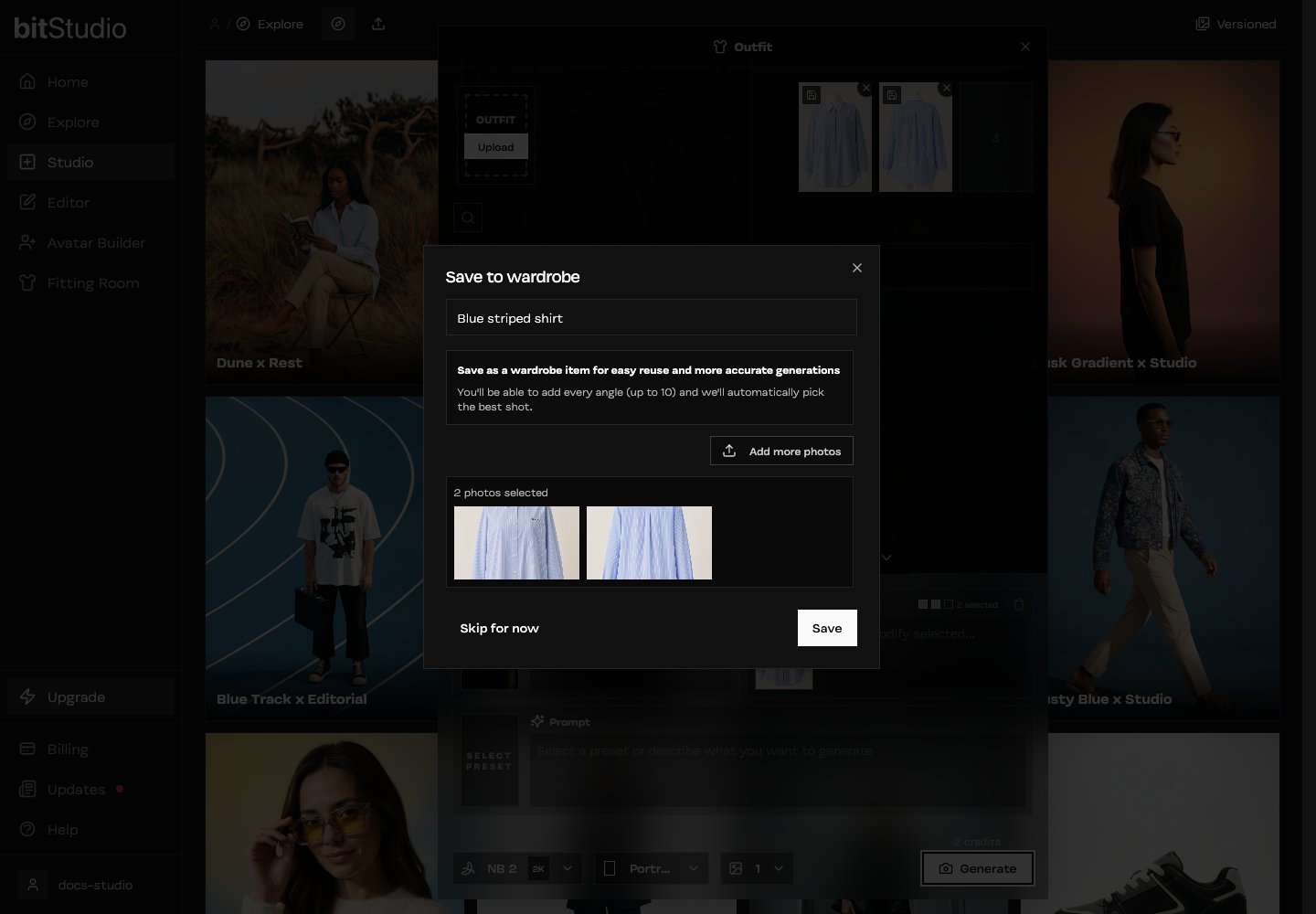
In **Save to wardrobe**, use a name you will recognize later, such as “Blue striped shirt.” Keep color variants as separate items when they are different products you want to select.
Choose **Add more photos** for back, side, or detail references. A wardrobe item can hold up to 10 photos.
Add useful information, rather than ten near-identical images. Avoid mixing different garments or colorways in the same item.
Select **Save**. The item becomes available in your wardrobe; angle and photo-quality analysis may continue in the background.
 ## Choose references for the next shot
Select the saved item from the outfit picker. Use the item’s edit controls to review its photos and details. If a result repeatedly uses the wrong view, check which views the item actually contains.
For **Generate**, you can select up to three outfit sources. Use those slots for different pieces of a look, such as a shirt, trousers, and a jacket. More selected items do not remove the need to check that they are compatible.
## Save once or use once?
| Choose… | When… |
| -------------------- | ------------------------------------------------------------------------------ |
| **Save to wardrobe** | You will reuse the product, need several angles, or are creating a collection. |
| **Skip for now** | You are trying a single image and do not need a reusable item yet. |
[Prepare the most useful garment photos →](/tips/source-photos)
## Choose references for the next shot
Select the saved item from the outfit picker. Use the item’s edit controls to review its photos and details. If a result repeatedly uses the wrong view, check which views the item actually contains.
For **Generate**, you can select up to three outfit sources. Use those slots for different pieces of a look, such as a shirt, trousers, and a jacket. More selected items do not remove the need to check that they are compatible.
## Save once or use once?
| Choose… | When… |
| -------------------- | ------------------------------------------------------------------------------ |
| **Save to wardrobe** | You will reuse the product, need several angles, or are creating a collection. |
| **Skip for now** | You are trying a single image and do not need a reusable item yet. |
[Prepare the most useful garment photos →](/tips/source-photos)